
Proposal Tracking Card (Visible on the Left Menu on Deals)
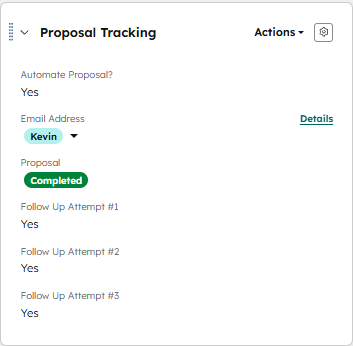
Conditional Logic:
Deal is in the sales pipeline
Proposal = Pending Customer Response
Automate Proposal = YES
Email Address = Deal Owners Name
YOU WILL NEED TO MANUALLY MARK "Automate Proposal" as Yes for the automation to take place
"Proposal" field & "Follow Up Attempts" will be automatically updated
What the automation does
A task will be assigned to the Deal Owner 12 business days from now (This is when the Deal will automatically close)
Automated emails will be sent on the following cadence (2 Days after the 3rd follow-up email is sent, the deal will be marked as closed dead)
- Follow Up 1 - Email
- Will be sent after 2 business days
- Additionally, the Deal Proposal Tracking Card will be updated to reflect this follow up attempt
- Follow Up 2 – Email
- Will be sent after 3 business days
- Additionally, the Deal Proposal Tracking Card will be updated to reflect this follow up attempt
- Follow Up 3 – Email
- Will be sent after 5 business days
- Additionally, the Deal Proposal Tracking Card will be updated to reflect this follow up attempt
- Deal stage --> Closed lost & Proposal Status --> completed
- This will be triggered 2 days after the 3rd follow up